
Using AI Agents to Debug My Linux Phone
I have been using a Furi FLX1s as a real phone, which means I have spent a lot of time staring at a modern Linux mobile stack and asking a deceptively simple question:
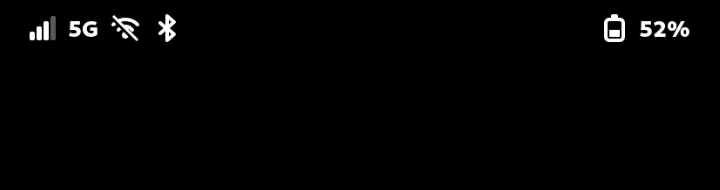
Why does this thing say the cellular signal is terrible when the modem appears to be on 5G and moving data?
This turned into one of the better examples I have seen of AI agents being genuinely useful for software engineering.
Not because the agents magically knew the answer. They did not.
They were useful because they were willing to do the tedious parts of the investigation over and over again: collect state, compare it against previous state, search source trees, build small test harnesses, record negative results, and help turn local experiments into pull requests.
The result was one merged PR, one open draft PR, a much better understanding of the phone's modem stack, and a plausible fix direction for a separate routing problem.
The Stack
The phone is a Furi FLX1s running FuriOS. The relevant stack looks roughly like this:
MediaTek modem / vendor radio pieces
-> oFono
-> ofono2mm
-> ModemManager
-> NetworkManager
-> Phosh / GNOME Settings Daemon / apps
That is a lot of places for state to get translated, cached, rounded, dropped, or misunderstood.
The first mistake would have been to debug the status bar directly. The status bar was only the final symptom.
Step One: Build a Baseline
The first useful thing the agent did was help me build a repeatable baseline harness.
I wanted to compare the FLX1s against a known-good Android phone on the same carrier, T-Mobile US. The agent wrote scripts to collect:
- oFono registration and signal state
- ModemManager state
- NetworkManager devices, connections, and routes
- raw AT command output
- interface-bound ping and HTTP checks
- speed test rows
- Android telephony and link-state output for comparison
The harness was deliberately conservative. Wi-Fi stayed available as a recovery path. Write-like modem commands were called out as unsafe. Evidence was split into public and private material so I could share the useful parts without leaking identifiers.
The first full baseline run changed the problem.
The FLX1s was not failing to connect to 5G. Across the sampled oFono data, it stayed on nr. Raw MediaTek signal looked plausible:
- average NR SS-RSRP: about
-105 dBm - average NR SS-RSRQ: about
-11 dB - average NR SS-SINR: about
12 dB - cellular download in that run: about
96 Mbps
But oFono reported this:
NetworkRegistration.Strength = 1Every time.
That was the key split. The radio path looked usable. The user-facing signal-strength path looked broken.
Following the Signal Into the Source
Once we had that evidence, the agent moved from logs to source.
It pulled the FuriLabs ofono-binder-plugin source tree and searched for the network registration strength code. The relevant file was src/binder_netreg.c.
The bug was small.
Both the HIDL and AIDL signal-strength helpers selected valid RSCP or RSRP values. But the fallback branches then passed rssi into the RSCP/RSRP conversion helpers.
That matters because RSSI can be invalid while NR RSRP is valid. In that case, the conversion can collapse to the bottom of the range, which is exactly the kind of thing that gives you a stuck 1% signal value while the phone is actually registered on NR.
The first patch changed four lines: pass rscp to the RSCP helper and rsrp to the RSRP helper.
The agent then helped with the boring validation work:
- build the package on the phone
- run
make test - run the Debian package build
- install the rebuilt plugin
- restart oFono
- wait 180 seconds for the stack to settle
- collect before/after signal samples
Before the patch, oFono strength was pinned at 1.
After the patch, settled NR samples reported 11, 14, and 11. A later spot check moved with changing raw signal quality, which suggested the value was tracking the radio instead of being forced upward.
That became FuriLabs/ofono-binder-plugin PR #1: netreg: use RSRP and RSCP for fallback strength.
It was merged on June 21, 2026.
The Second PR: Make the Number Useful
The first PR fixed a real variable bug. It did not necessarily make the displayed number useful.
A phone with working NR data should not look nearly dead in the UI just because a raw dBm value was mapped through a generic linear percentage.
So the next question was: what should this number mean?
My first instinct was to ask how Android handles this. Codex searched the AOSP sources and found the relevant signal-strength mapping code. We did not copy that code wholesale. The useful part was the concept: Android treats signal display as a thresholded, user-facing service indicator, not a raw RF measurement dumped straight into the UI.
That gave us a better direction.
I had already collected a lot of local logging data from the FLX1s: raw modem values, oFono state, ModemManager state, bearer health, and observed connectivity. I used another agent to review that data and help derive a curve specific to what this phone was actually reporting.
The result was a piecewise RSRP mapping:
- prefer NR
ssRsrpwhen available - map NR RSRP with a tested user-facing curve
- otherwise map LTE
rsrpwith a separate LTE curve - otherwise fall back to the existing generic signal percentage
- leave RSRQ/SINR dampening out of the first version
The validation result was much closer to what I expected from a phone UI.
The original state had been:
oFono Strength = 1
ModemManager SignalQuality = 1
registered on NR
With the final curve test:
oFono Strength = 60
ModemManager SignalQuality = 60
still registered on NR
cellular ping and HTTP over the active bearer succeeded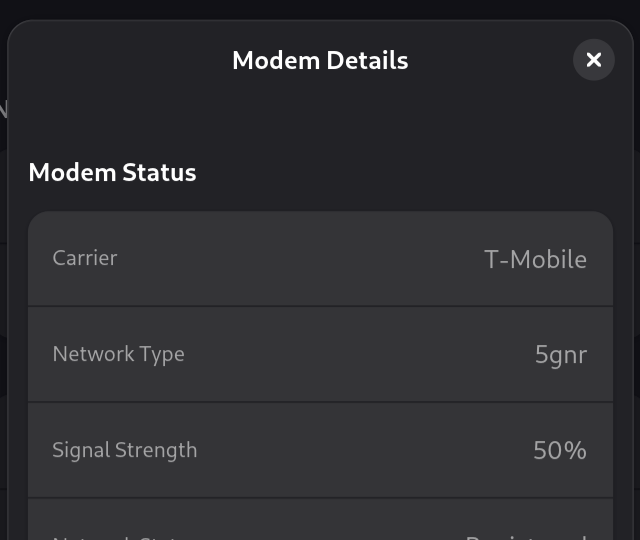
That became FuriLabs/ofono-binder-plugin PR #2: binder_netreg: report usable RSRP strength curve.
That PR is open as a draft as of June 26, 2026.
The Route Bug Was Separate
Fixing the signal value did not explain every cellular problem.
In one recovery run, the phone was registered, but Linux had no usable cellular default route. Before recovery:
registered: yes
default route: none
fast.t-mobile.com internet context: inactive
failure class: registered_no_default_route
After a targeted NetworkManager GSM reconnect:
default route: ccmni3
fast.t-mobile.com internet context: active
failure class: healthy
That gave the bug a useful name: registered, but no default route.
One of the most valuable things the agent did here was help disprove an attractive theory.
I had a theory that a brief Wi-Fi enable/disable cycle might be required after boot to kick cellular into working order. The agent wrote a fresh-boot test for that. In the test run, the phone came up healthy before the Wi-Fi kick.
That negative result mattered. The right recovery target was not "toggle Wi-Fi and hope." It was "detect the specific registered-without-route state and repair that."
Duplicate NetworkManager Ownership
The next useful finding was that NetworkManager could see two paths for one modem:
ril_0   native oFono device
/ril_0  ofono2mm / ModemManager device
Both could try to manage packet data.
A runtime-only test marked the native ril_0 path unmanaged and kept the ofono2mm/ModemManager path as the sole cellular owner. The result was one working cellular default route.
That is the kind of result I like: not a complete fix, but a much sharper model.
The agent then prototyped an ofono2mm direction:
- install a NetworkManager config that marks native
ril_*devices unmanaged - teach
ofono2mmto rerun APN activation when NetworkManager returns on D-Bus
That still needs broader validation across reboot, NetworkManager restart, and WWAN toggles. But the problem is no longer vague. It is a specific ownership and reactivation issue.
What the Agents Were Good At
This was not a case of asking an AI system "what is wrong with my phone?" and getting a magic answer.
The agents were useful because they made the investigation cheaper:
- write repeatable probes
- preserve before/after evidence
- search source trees quickly
- pore over hundreds of source files to find the ones I needed to look at
- compare runtime behavior to code paths
- keep negative results in the record
- draft small patches
- build and test packages on the device
- write PR descriptions with validation details
- keep private and public evidence separate
The most important behavior was epistemic discipline. The agent kept separating:
- what we know
- what we suspect
- what a test disproved
- what still needs live validation
That is exactly what I needed for this kind of debugging.
What Changed
At the start, I had a phone that felt wrong.
At the end, I had:
- a repeatable cellular test harness
- public reports and redacted evidence
- one merged upstream PR fixing a real oFono binder plugin bug
- one open draft upstream PR proposing a better NR/LTE service-strength curve
- a plausible route ownership fix direction in
ofono2mm
The broader lesson is not that AI fixed the phone.
I still had to decide what was safe. I still had to run the live tests. I still had to interpret the phone-specific behavior. I still had to decide which claims were strong enough for a PR.
But AI agents made it practical for one person to move across the whole stack: modem, oFono, ModemManager, NetworkManager, Debian packaging, and GitHub, in one day of work and one day of data gathering.
That is the part that feels new.
The agent did not replace engineering judgment. It made the investigation feel like I had a small, tireless lab assistant who was happy to run the next careful experiment.